

Array Methods You Must Know
Essential JavaScript array methods every beginner should understand.

Hello readers! 👋
In the previous article, we learned the basics of arrays — how to create them, access elements, update values, and loop through them.
But when working with arrays in real JavaScript code, we rarely rely only on loops. JavaScript provides several built-in array methods that make common operations much easier and more readable.
In this article, we’ll explore some essential array methods like push(), pop(), map(), filter(), and reduce() — methods that every JavaScript beginner should know.
1. push() and pop()
These methods are used to add or remove elements from the end of an array.
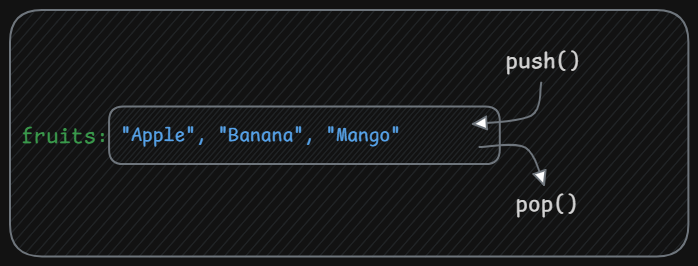
This method adds one or more elements to the end of an array and returns the new length of the array.
example:
const fruits = ["Apple", "Banana"];

const newLength = fruits.push("Mango");

console.log(fruits);      // ["Apple", "Banana", "Mango"]
console.log(newLength);   // 3
This method removes the last element from an array and returns the removed element.
example:const removedFruit = fruits.pop(); console.log(fruits); // ["Apple", "Banana"] console.log(removedFruit); // "Mango"
2. shift() and unshift()
These methods are similar to push() and pop(), but they work at the beginning of the array.
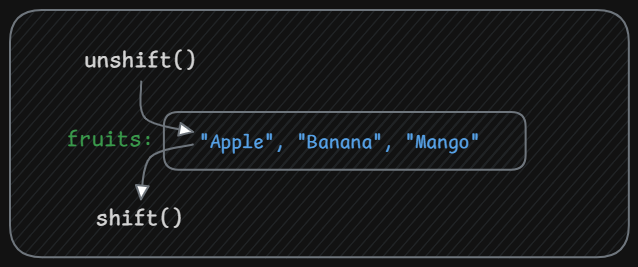
unshift(): This method adds one or more elements to the beginning of an array and returns the new length of the array.example:
const newLengthUnshift = fruits.unshift("Mango"); console.log(fruits); // ["Mango", "Apple", "Banana"] console.log(newLengthUnshift); // 3shift(): This method removes the first element from an array and returns that removed element.example:
const removedFruitShift = fruits.shift();

console.log(fruits); // Output: ["Apple", "Banana"]
console.log(removedFruitShift); // Output: "Mango"
So far, these methods modify the array by adding or removing elements.
The next methods help us process or transform array data.
3. map()
The map() method creates a new array by applying a function to each element of the original array.
Example: Squaring numbers.
Traditional approach using a loop:
const numbers = [1, 2, 3, 4];

const squaredNumbersLoop = [];

for (let i = 0; i < numbers.length; i++) {
  squaredNumbersLoop.push(numbers[i] * numbers[i]);
}

console.log(squaredNumbersLoop); // [1, 4, 9, 16]
Using map():
const squaredNumbersMap = numbers.map(function(num) {
  return num * num;
});

console.log(squaredNumbersMap); // [1, 4, 9, 16]
map() returns a new transformed array, while the original array remains unchanged.
dry run:
Original Array
[1, 2, 3, 4]

        map(num => num * num)

Transformation
1 x 1 → 1
2 x 2 → 4
3 x 3 → 9
4 x 4 → 16

New Array
[1, 4, 9, 16]
4. filter()
The filter() method creates a new array containing elements that match a condition.
Example: Finding adults from a list of ages.
Using a loop:
const ages = [15, 22, 18, 30, 12, 45, 17];

const adultsLoop = [];

for (let i = 0; i < ages.length; i++) {
  if (ages[i] >= 18) {
    adultsLoop.push(ages[i]);
  }
}

console.log(adultsLoop); // [22, 18, 30, 45]
Using filter():
const adultsFilter = ages.filter(function(age) {
  return age >= 18;
});

console.log(adultsFilter); // [22, 18, 30, 45]
filter() returns a new array with elements that pass the condition.
dry run:
Original Array
[15, 22, 18, 30, 12, 45, 17]

        filter(age >= 18)

Evaluation
15 ✖
22 ✔
18 ✔
30 ✔
12 ✖
45 ✔
17 ✖

Filtered Array
[22, 18, 30, 45]]
5. reduce()
The reduce() method combines all elements of an array into a single value.
It works by running a function on each element and keeping a running result called the accumulator.
Example: Summing product prices.
Using a loop:
const productPrices = [10, 25, 5, 50];

let totalPriceLoop = 0;

for (let i = 0; i < productPrices.length; i++) {
  totalPriceLoop += productPrices[i];
}

console.log(totalPriceLoop); // 90
Using reduce():
const totalPriceReduce = productPrices.reduce(function(accumulator, currentValue) {
  return accumulator + currentValue;
}, 0);

console.log(totalPriceReduce); // 90
Here:
accumulatorstores the running totalcurrentValueis the current element in the array
dry run:
Combine all values into one
Array
[10, 25, 5, 50]

reduce((accumulator, currentValue) => accumulator + currentValue, 0)

Initial Value
accumulator = 0
Step-by-step execution
Step 1
accumulator = 0
currentValue = 10

0 + 10 = 10
New accumulator → 10


Step 2
accumulator = 10
currentValue = 25

10 + 25 = 35
New accumulator → 35


Step 3
accumulator = 35
currentValue = 5

35 + 5 = 40
New accumulator → 40


Step 4
accumulator = 40
currentValue = 50

40 + 50 = 90
New accumulator → 90
Final Result
Total → 90
reduce() processes each element in the array and keeps updating the accumulator until a single final value is produced.
6. forEach()
Sometimes we only need to run a function for every element without creating a new array.
The forEach() method executes a function once for each element.
Example:
const fruitsList = ["Apple", "Banana", "Orange"];

fruitsList.forEach(function(fruit, index) {
  console.log(`Item at index \({index}: \){fruit}`);
});
Output:
Item at index 0: Apple
Item at index 1: Banana
Item at index 2: Orange
forEach() is commonly used when we simply want to iterate through an array.
Quick Summary
push()    → add element to end
pop()     → remove element from end

unshift() → add element to start
shift()   → remove first element

map()     → transform values
filter()  → select values
reduce()  → combine values into one
forEach() → run a function for every element
Practice Exercise
Create the following array:
[5, 10, 15, 20]
Try the following tasks:
Use
map()to double each numberUse
filter()to get numbers greater than 10Use
reduce()to calculate the total sum
Conclusion
Array methods make it much easier to work with data in JavaScript. Instead of writing long loops, we can use built-in methods like map(), filter(), and reduce() to write cleaner and more expressive code.
These methods are widely used in modern JavaScript and are essential when working with real-world data.
Thanks for reading!


