

Inside Node.js: Understanding Global Objects, Architecture, and the Event Loop
A beginner-friendly breakdown of Node.js internals, including global objects, architecture, and the event loop.
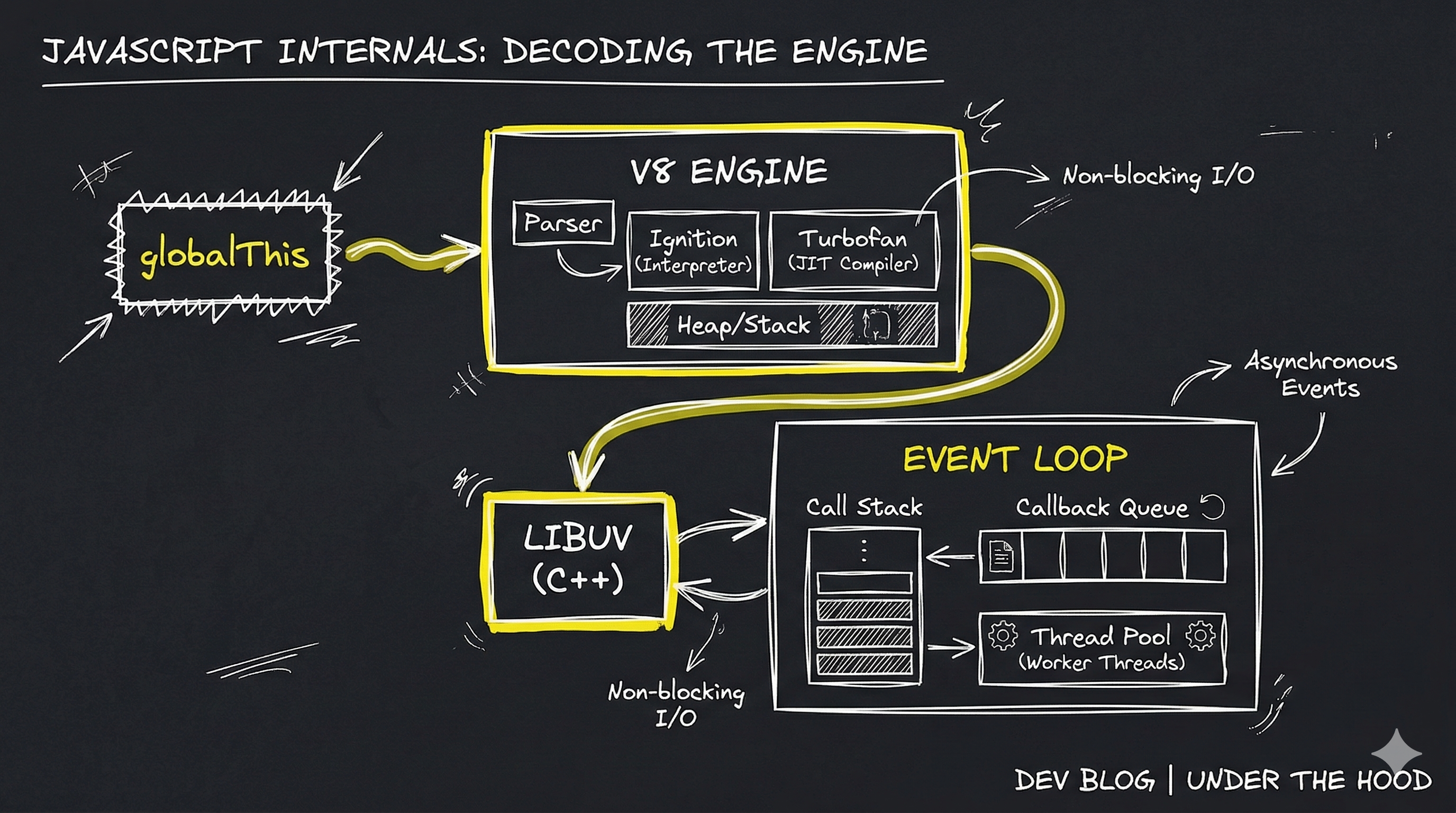
JavaScript Behind the Scenes: Global Objects, Node.js Architecture, and the Event Loop
When we start learning JavaScript, we usually focus on syntax — variables, functions, loops, and conditions. But after some time, an important question appears:
How does JavaScript actually run behind the scenes?
In this post, I’ll walk through some core concepts I recently learned, including global objects, the difference between browser and Node.js environments, and how Node.js executes asynchronous code.
Let’s explore them step by step.
Global Objects in JavaScript
A global object is an object that is available everywhere in your code without importing it.
For example:
console.log(Math.PI);
console.log(setTimeout);
console.log(JSON);
These objects are available globally, meaning you can access them from anywhere in your program.
Think of the global object as a big container that holds built-in tools provided by JavaScript.
window, global, and globalThis
Different environments use different global objects.
In browsers, the global object is called window.
window.alert("Hello");
In Node.js, the global object is called global.
global.console.log("Hello");
This difference created confusion for developers who wanted their code to work in multiple environments.
To solve this, JavaScript introduced globalThis.
globalThis.console.log("Hello");
globalThis works in browsers, Node.js, and other environments. It provides a standard way to access the global object.
The Problem Before globalThis
Before globalThis, developers had to write complex checks to determine the environment.
Example:
var globalObj =
  typeof window !== "undefined"
    ? window
    : typeof global !== "undefined"
    ? global
    : this;
This was messy and difficult to maintain.
globalThis solved this problem by giving JavaScript a universal reference to the global object.
Browser Global Scope vs Node.js Module Scope
The global scope behaves differently in browsers and Node.js.
In the browser:
var name = "Alex";
console.log(window.name);
Here, the variable becomes a property of the window object.
But in Node.js, things work differently.
If you write:
var name = "Alex";
It does not become a property of the global object.
This happens because Node.js wraps every file inside a module.
How the Node.js Module Wrapper Works
Every file in Node.js is automatically wrapped inside a function.
It looks like this internally:
(function(exports, require, module, __filename, __dirname) {

  // your code here

});
Because of this wrapper:
• Variables stay inside the file
• Global scope is protected
• Each file behaves like a separate module
This design helps keep Node.js applications organized and prevents global pollution.
Node.js Architecture
Node.js has three important components working together:
V8 Engine
Libuv
Event Loop
You can imagine the flow like this:
JavaScript Code → V8 Engine → Libuv → Event Loop → Callback Execution
Each component has a specific responsibility.
How the V8 Engine Executes JavaScript
The V8 engine is the JavaScript engine created by Google. It is used in Chrome and also inside Node.js.
Its main job is to execute JavaScript code.
Steps:
It reads the JavaScript code.
It converts the code into machine code.
It executes the instructions.
Because V8 compiles JavaScript directly into machine code, it runs very fast.
The Role of Libuv
JavaScript itself cannot directly handle operations like:
• File system access
• Network requests
• Timers
• Asynchronous tasks
Libuv is a C library that Node.js uses to handle these tasks.
For example:
setTimeout(() => {
  console.log("Hello after 2 seconds");
}, 2000);
Here’s what happens:
JavaScript registers the timer → Libuv manages the waiting → once the timer finishes, the callback is sent to the event loop.
Understanding the Event Loop
The Event Loop is what makes Node.js non-blocking.
Consider this example:
console.log("Start");

setTimeout(() => {
  console.log("Timer finished");
}, 2000);

console.log("End");
Output:
Start
End
Timer finished
Node.js does not wait for the timer to finish. Instead, it continues executing the remaining code.
The timer runs in the background through Libuv, and once it's complete, the Event Loop picks up the callback and executes it.
This is why Node.js is known for its non-blocking architecture.
Final Thoughts
Understanding how JavaScript works behind the scenes can make many concepts easier to grasp.
In this article we explored:
• Global objects in JavaScript
• Differences between window, global, and globalThis
• How Node.js modules work
• The basics of Node.js architecture
• The roles of V8, Libuv, and the Event Loop
These concepts may seem complex at first, but they become clearer with practice and experimentation.
As I continue learning JavaScript and Node.js, understanding these internal mechanisms helps me write better and more efficient code.
Thanks for reading! );


