


Ever wondered how your browser knows where a website "lives"? You type in a URL like google.com, and within milliseconds, the page appears. But behind the scenes, a silent conversation is happening between your computer and several servers around the world.
Browser → DNS → IP Address → Website Server
This magic is powered by DNS, and understanding how it works starts with its building blocks: DNS Records.
What is DNS? (The Internet’s Phonebook)
Think of the internet as a massive city. Every building (website) has a specific coordinate called an IP Address (like 192.168.1.1). Humans aren't great at remembering long strings of numbers, but we’re excellent at remembering names like amazon.com.
DNS (Domain Name System) is the phonebook of the internet. It translates the names you type into the numbers the computer needs to find the right "house."
google.com  →  142.250.x.x
amazon.com →  176.x.x.x
Why do we need "Records"?
If DNS is the phonebook, Records are the individual entries. A phonebook doesn't just have your phone number; it might have your home address, your business fax, or a note saying "In case of emergency, call this person." Different DNS records tell the internet different things about your domain.
example.com
 ├─ NS
 ├─ A
 ├─ MX
 ├─ TXT
1. The NS Record: The "Manager"
NS = Name Server
Think of NS records as:
“Which post office handles mail for this area?”
The Problem: When someone looks for your website, who has the official, up-to-date phonebook for it?
The Solution: The NS record points to the specific server that "owns" your DNS records.
Think of NS records like the post office for your domain.
The internet asks: “Hey, who knows about
example.com?”The NS record replies: “Ask these name servers.”
  Internet
    ↓
  NS Record
    ↓
  Authoritative DNS Server
Without NS records, nothing else works.
They are the starting point for everything DNS-related.
2. The A Record: The "House Address" (IPv4)
The A Record is the most common type. The "A" stands for "Address."
The Problem: Your browser has a name (
mysite.com) but needs a location (an IPv4 address).The Solution: This record maps a domain name directly to a string of numbers like
93.184.216.34.Real-life Example: It’s exactly like looking up a person’s name in a physical directory and finding their Street Address.
mysite.com → 93.184.216.34 → Web Server
3. The AAAA Record: The "New House Address" (IPv6)
The world is running out of standard IPv4 addresses, so we created a new, much longer version called IPv6.
The Problem: You have a modern server with a long IPv6 address (e.g.,
2606:2800:220:1:248:1893:25c8:1946).The Solution: The AAAA Record (often called "Quad-A") does the exact same thing as an A record, but for these newer, longer addresses.
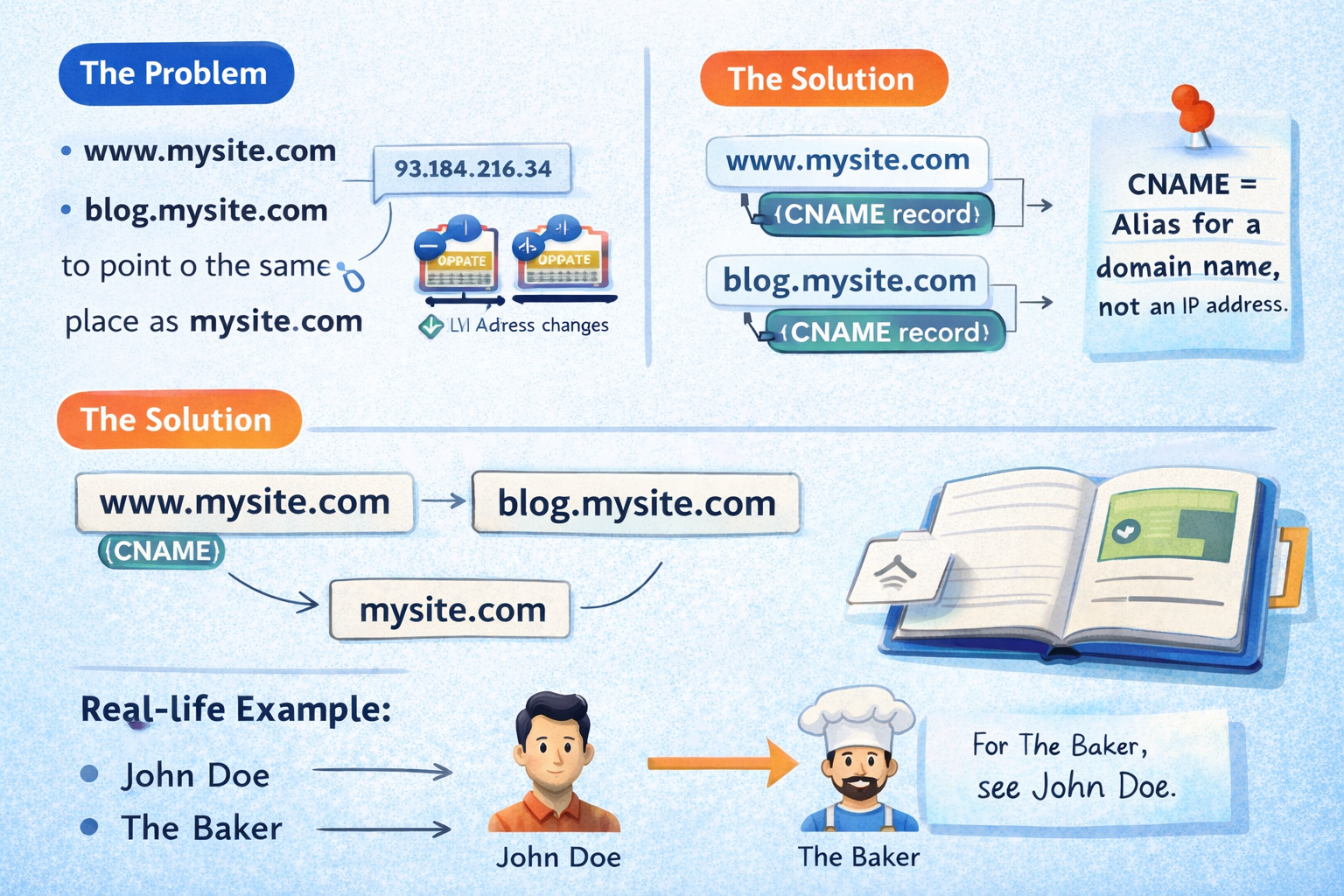
4. The CNAME Record: The "Alias"
CNAME stands for Canonical Name.
The Problem: You want
www.mysite.comandblog.mysite.comto point to the exact same place asmysite.com. If your IP address changes, you don't want to update ten different records.The Solution: Instead of pointing to an IP address, a CNAME points one name to another name.
  www.mysite.com  ──▶  mysite.com
  blog.mysite.com ──▶  mysite.com
Real-life Example: It’s like a "Doing Business As" (DBA) name. If "John Doe" is also known as "The Baker," the phonebook says: "For The Baker, see John Doe."
Common beginner confusion: A vs CNAME
A record → name → IP address
CNAME → name → another name
5. The MX Record: The "Mail Delivery"
MX stands for Mail Exchanger.
The Problem: Someone sends an email to
hello@mysite.com. How does the internet know which server handles your emails (like Gmail or Outlook) versus your website files?The Solution: The MX record tells the internet, "If you have mail for this domain, send it here."
Real-life Example: Like a P.O. Box. Your house address (A Record) is where you live, but your MX record is where your letters are actually delivered.
  Email → MX → Mail Server
  Web   → A  → Web Server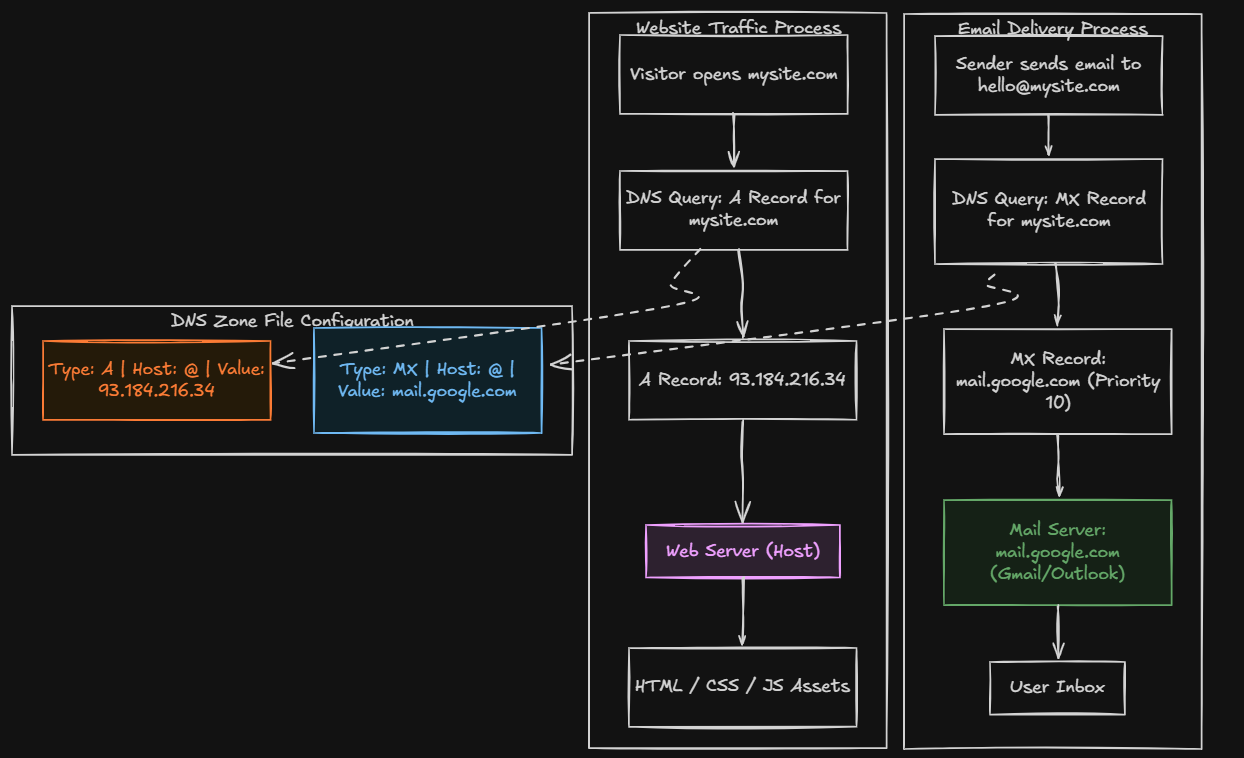
Beginner Tip: NS vs. MX. The NS record says who manages all your records; the MX record only cares about your email.
6. The TXT Record: The "Sticky Note"
TXT is simply "Text."
The Problem: Services like Google or Facebook need to verify that you actually own your website, or you need to add security notes to prevent email spam.
The Solution: This record lets you drop any plain text into your DNS settings for others to read.
Real-life Example: It’s like a Verification Note or a "Sign" in your window that proves you are the owner of the shop.
How They All Work Together
Imagine you own coffeeblog.com. Here is how your records might look:
User
 ↓
NS → A → Website
 ↓
MX → Email
| Record Type | Host / Name | Value | Purpose |
| NS | coffeeblog.com | ns1.digitalocean.com | Tells the world where the settings are. |
| A | coffeeblog.com | 104.21.75.12 | Sends visitors to your web server. |
| CNAME | www | coffeeblog.com | Makes sure www works too. |
| MX | coffeeblog.com | mail.google.com | Delivers your emails to Gmail. |
| TXT | coffeeblog.com | google-site-verification=123... | Proves to Google you own the site. |
When a user visits your site, their computer checks the NS record to find the manager, looks up the A record to find your server, and uses the MX record if they decide to send you an email.
DNS might seem like a lot of jargon, but at its heart, it’s just a series of simple directions helping everyone find their way around the digital world.


